
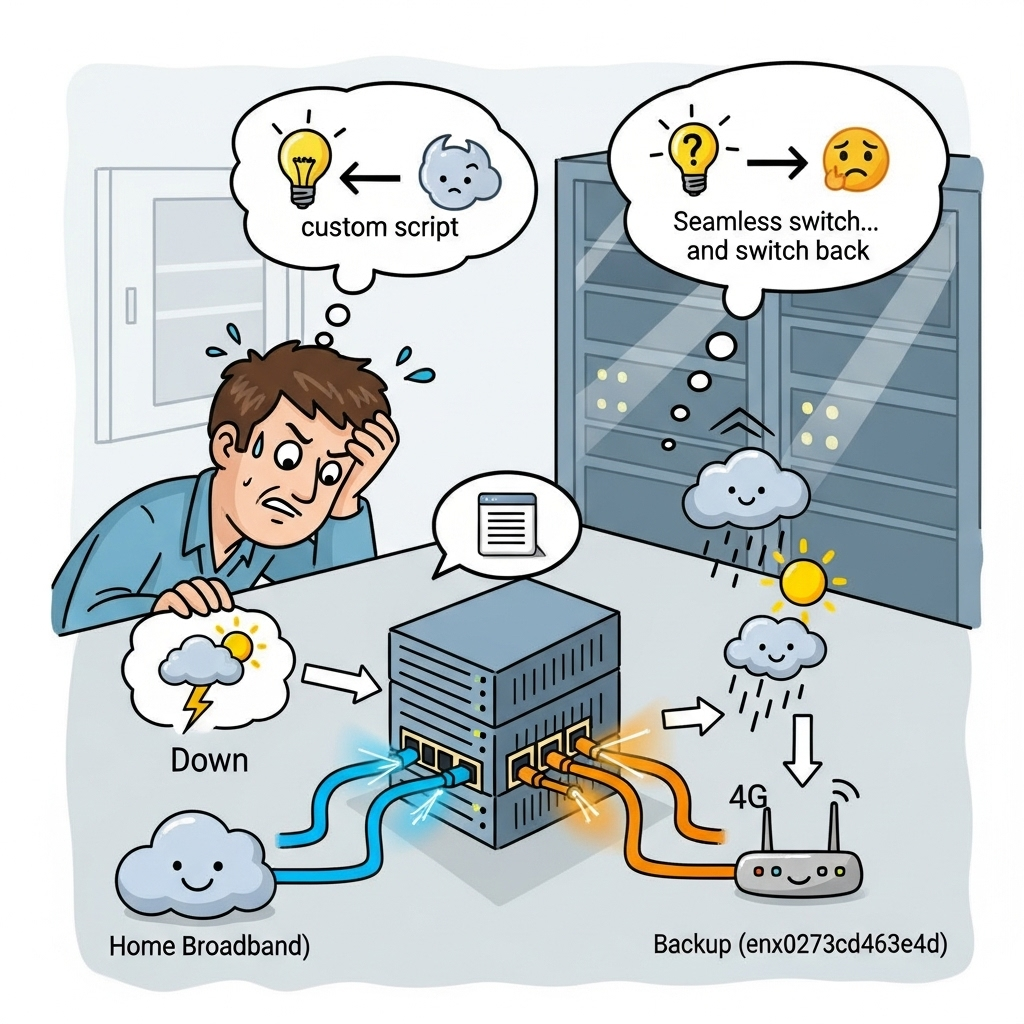
Setting up dual-WAN (Wide Area Network) failover on a Linux system is a common practice to ensure high availability for services. I recently deployed such a solution on my Ubuntu server: a primary line (enp0s11, connected to my home broadband) and a backup line (enx027c3d463e4d, connected to a 4G router). In theory, my custom script should seamlessly switch to the backup line when the primary goes down, and then switch back once the primary recovers.
However, reality decided to teach me a lesson.
The Symptoms: Primary Line “Down,” Script Keeps Switching
My failover script continuously reported that the primary line (enp0s11) couldn’t access the internet, and kept routing traffic through the 4G backup line. This meant my server was always using 4G, even though the primary interface showed as UP and had successfully obtained an IP address (192.168.1.115).
When I tried to force a ping 8.8.8.8 through the enp0s11 interface, the result was always 100% packet loss. This seemed to confirm the “outage” of the primary line.
Initial Diagnosis: Router or ISP Problem?
Based on these symptoms, my first thought was: Is my main router broken? Or is there an issue with my Internet Service Provider (ISP)? After all, if the virtual machine couldn’t reach the internet via enp0s11, the most direct suspects were the next hop – the main router – or the ISP upstream from it.
The ip a output confirmed that the enp0s11 interface’s IP configuration was correct and it was in an UP state. But this command couldn’t tell me anything about the router’s or ISP’s status.
A Ray of Hope: SSHing to the Main Router
After ruling out the virtual machine’s firewall (UFW) as a preliminary suspect, I decided to try a crucial validation step: SSH directly into my main router (192.168.1.1) and execute wget http://www.baidu.com on the router itself.
The result was surprising: The router itself could successfully access Baidu!
This completely overturned my previous diagnosis regarding the main router or ISP issues. If the router could access the internet, then the problem had to lie in the traffic forwarding between my virtual machine (192.168.1.115) and the main router (192.168.1.1).
The Real Culprit: A Missing Default Route!
Since the router was fine, and the VM and router could communicate (otherwise SSH wouldn’t work), the problem narrowed down to the routing table.
When I checked the virtual machine’s routing table (ip route show), I found a critical anomaly: while there was a default route for enx027c3d463e4d (the 4G backup line), there was no default route for enp0s11 (the primary line)!
This meant that even though the enp0s11 interface had an IP address, it didn’t know how to send traffic to the internet. It was like a house with an address, but no roads leading out.
I immediately manually added the missing route:
ip route add default via 192.168.1.1 dev enp0s11 metric 50Then, I tried ping -I enp0s11 119.29.29.29 again, and a miracle happened! 100% success! The primary line instantly regained internet access.
The “Crime” Revealed: A Scripting Blunder?
Why was enp0s11‘s default route missing? I thought back to my recent operations, and the most likely reason was: during debugging and testing my failover script, an accidental command or logical error inadvertently deleted the default route for enp0s11. The script might have executed an overly broad deletion command while attempting to switch lines or clean up routes, leading to the primary line’s “amnesia.”
When a system reboot occurred, the ip route show output again confirmed that the issue was resolved:
default via 192.168.1.1 dev enp0s11 proto dhcp src 192.168.1.115 metric 100
default via 192.168.42.129 dev enx027c3d463e4d proto dhcp src 192.168.42.91 metric 100
The default route for enp0s11 appeared automatically with the proto dhcp flag, indicating that my Netplan/NetworkManager configuration was correct, and the system would obtain and configure this route via DHCP upon boot. The previous problem was indeed temporary and caused by human (or script) error.
The Solution: My Robust Dual-WAN Failover Script
To prevent such issues and ensure reliable failover, I developed a Bash script that leverages Policy-Based Routing (PBR). PBR is crucial because it allows traffic originating from a specific source IP address (e.g., an interface’s IP) to use a dedicated routing table, ensuring that connectivity checks for each interface are accurate and independent of the main routing table.
Prerequisites for Policy-Based Routing
Before running the script, you need to define the custom routing tables in /etc/iproute2/rt_tables. Add the following lines:
# /etc/iproute2/rt_tables
10      main_if_table
20      backup_if_table
Key Features of the Script:
- Configurable Parameters: Easily adjust interface names, monitoring targets (including local gateways and public IPs), failure thresholds, and check intervals.
- Policy-Based Routing Setup (
setup_policy_routingfunction):- It dynamically retrieves the IP addresses of the main and backup interfaces.
- It adds
ip ruleentries, directing traffic originating from each interface’s IP to its respective custom routing table (main_if_tableorbackup_if_table). - Crucially, it adds a default route within each of these custom tables, pointing to the interface’s gateway. This ensures that when
ping -I <interface>is used, the traffic correctly exits via that interface and uses its dedicated route, allowing for accurate connectivity checks.
- Robust Connectivity Checks (
check_interface_connectivityfunction):- First, it verifies if the interface has an IP address.
- Then, it pings the interface’s local gateway. If the gateway is unreachable, the interface is immediately considered down.
- If the gateway is reachable, it proceeds to ping multiple public IP addresses (e.g., 8.8.8.8, 1.1.1.1). Only if at least one public IP is reachable is the interface considered fully “UP” for internet access. This prevents false positives where local network is fine but internet is not.
- The
-Iflag withpingis essential here, as it forces the ping packets to originate from the specified interface, ensuring our policy routes are used.
- Intelligent Failover Logic:
- Monitors the main interface continuously.
- If the main interface fails for
FAIL_THRESHOLDconsecutive checks, it attempts to switch to the backup interface, but only if the backup is also functional. - When the main interface recovers, it waits for
MAIN_IF_RECOVERY_WAITseconds to ensure stability before switching back. - Logs all actions and status changes to a specified log file.
The Script:
#!/bin/bash

# --- Configuration Section ---
MAIN_IF="enp0s11"
BACKUP_IF="enx027c3d463e4d"

# Monitoring targets (first one MUST be the gateway)
MONITOR_TARGETS_MAIN=("192.168.1.1" "8.8.8.8" "1.1.1.1" "Ikkmir")
MONITOR_TARGETS_BACKUP=("192.168.42.129" "8.8.8.8" "1.1.1.1" "Ikkmir")

FAIL_THRESHOLD=3
CHECK_INTERVAL=5
PING_TIMEOUT=1
MAIN_IF_RECOVERY_WAIT=10

LOG_FILE="/var/log/network_failover_vm.log"
# --- END Configuration Section ---

# Routing table IDs and names (must match /etc/iproute2/rt_tables)
MAIN_IF_TABLE_ID=10
BACKUP_IF_TABLE_ID=20

# --- Functions ---

log_time() {
    echo "$(date '+%Y-%m-%d %H:%M:%S')"
}

log_message() {
    echo "$(log_time) - $1" | tee -a "$LOG_FILE"
}

get_current_default_gateway_if() {
    ip route show default | awk '{print $5}' | head -n 1
}

# Set up policy-based routing for each interface
setup_policy_routing() {
    log_message "INFO: Setting up policy-based routing..."

    # Get IP addresses of interfaces
    MAIN_IF_IP=$(ip -4 addr show ${MAIN_IF} | grep -oP '(?<=inet\s)\d+(\.\d+){3}')
    BACKUP_IF_IP=$(ip -4 addr show ${BACKUP_IF} | grep -oP '(?<=inet\s)\d+(\.\d+){3}')

    if [ -z "$MAIN_IF_IP" ] || [ -z "$BACKUP_IF_IP" ]; then
        log_message "ERROR: Could not get IP address for one or both interfaces. Exiting."
        # In a production script, you might want to handle this more gracefully,
        # perhaps by retrying or alerting. For this example, we'll exit.
        exit 1
    fi
    log_message "DEBUG: Main IF IP: $MAIN_IF_IP, Backup IF IP: $BACKUP_IF_IP"

    # --- Setup policy routing for Main Interface ---
    # Rule: Traffic originating from $MAIN_IF_IP should query routing table $MAIN_IF_TABLE_ID
    # 'ip rule del' is used to clean up old rules, preventing duplicates
    ip rule del from ${MAIN_IF_IP} table ${MAIN_IF_TABLE_ID} 2>/dev/null
    ip rule add from ${MAIN_IF_IP} table ${MAIN_IF_TABLE_ID}
    # In routing table $MAIN_IF_TABLE_ID, add/replace the default route
    ip route replace default via ${MONITOR_TARGETS_MAIN[0]} dev ${MAIN_IF} table ${MAIN_IF_TABLE_ID}

    # --- Setup policy routing for Backup Interface ---
    # Rule: Traffic originating from $BACKUP_IF_IP should query routing table $BACKUP_IF_TABLE_ID
    ip rule del from ${BACKUP_IF_IP} table ${BACKUP_IF_TABLE_ID} 2>/dev/null
    ip rule add from ${BACKUP_IF_IP} table ${BACKUP_IF_TABLE_ID}
    # In routing table $BACKUP_IF_TABLE_ID, add/replace the default route
    ip route replace default via ${MONITOR_TARGETS_BACKUP[0]} dev ${BACKUP_IF} table ${BACKUP_IF_TABLE_ID}

    log_message "INFO: Policy-based routing setup complete."
    # Clear routing cache to ensure new rules are applied
    ip route flush cache
}

# Check interface connectivity (now correctly checks public internet due to PBR)
check_interface_connectivity() {
    local iface="$1"
    local -n targets_ref="$2" # This is a nameref, will point to MONITOR_TARGETS_MAIN or BACKUP

    local gateway_reachable=0
    local public_ip_reachable=0

    # 1. Check if IP address exists on the interface
    if ! ip addr show "$iface" | grep -q "inet "; then
        log_message "DEBUG: Interface $iface has no IP address."
        return 1 # Interface has no IP address, considered DOWN
    fi

    # 2. Attempt to ping the gateway (first target in the array)
    local gateway_target="${targets_ref[0]}"
    log_message "DEBUG: Pinging gateway $gateway_target via $iface"
    if ping -c 1 -W "$PING_TIMEOUT" -I "$iface" "$gateway_target" > /dev/null 2>&1; then
        log_message "DEBUG: Successfully pinged gateway $gateway_target via $iface."
        gateway_reachable=1
    else
        log_message "DEBUG: Failed to ping gateway $gateway_target via $iface. Interface is considered DOWN for local connectivity."
        return 1 # Gateway unreachable, interface considered DOWN
    fi

    # 3. If gateway is reachable, attempt to ping public IP addresses (starting from the second target in the array)
    # If only gateway is configured, assume UP if gateway is reachable (not recommended, but included for flexibility)
    if [ "${#targets_ref[@]}" -eq 1 ]; then
        log_message "DEBUG: Only gateway configured for $iface. Assuming UP if gateway is reachable."
        return 0
    fi

    # Iterate through public IP addresses
    for ((i=1; i<${#targets_ref[@]}; i++)); do
        local public_target="${targets_ref[$i]}"
        log_message "DEBUG: Pinging public IP $public_target via $iface"
        if ping -c 1 -W "$PING_TIMEOUT" -I "$iface" "$public_target" > /dev/null 2>&1; then
            log_message "DEBUG: Successfully pinged public IP $public_target via $iface."
            public_ip_reachable=1
            break # As soon as one public IP is reachable, consider public network connected
        fi
    done

    # Final decision: Gateway MUST be reachable AND at least one public IP MUST be reachable
    if [ "$gateway_reachable" -eq 1 ] && [ "$public_ip_reachable" -eq 1 ]; then
        log_message "DEBUG: Interface $iface is considered UP (gateway and public IP reachable)."
        return 0
    else
        log_message "DEBUG: Interface $iface is considered DOWN (gateway reachable, but no public IP reachable)."
        return 1
    fi
}

# --- Main Logic ---
log_message "--- Network failover script started ---"

# Set up policy routing before entering the main loop
setup_policy_routing

fail_count=0
while true; do
    current_default_if=$(get_current_default_gateway_if)
    log_message "INFO: Current default interface is: $current_default_if"

    # Check primary line status
    if check_interface_connectivity "$MAIN_IF" MONITOR_TARGETS_MAIN; then
        # Primary line is healthy
        if [ "$current_default_if" != "$MAIN_IF" ]; then
            log_message "INFO: Primary network ($MAIN_IF) is back online. Waiting ${MAIN_IF_RECOVERY_WAIT}s for stabilization."
            sleep "$MAIN_IF_RECOVERY_WAIT"

            # Re-confirm primary line status after waiting
            if check_interface_connectivity "$MAIN_IF" MONITOR_TARGETS_MAIN; then
                log_message "INFO: Primary network ($MAIN_IF) confirmed stable. Switching back."
                # Replace the main default route to point to the primary interface
                ip route replace default via "${MONITOR_TARGETS_MAIN[0]}" dev "$MAIN_IF"
                log_message "INFO: Switched back to ${MAIN_IF}."
                fail_count=0
                ip route flush cache
            else
                log_message "WARN: Primary network ($MAIN_IF) became unstable after waiting. Staying on backup."
            fi
        else
            log_message "DEBUG: Primary network ($MAIN_IF) is active and healthy."
            fail_count=0
        fi
    else
        # Primary line is NOT healthy
        fail_count=$((fail_count + 1))
        log_message "WARN: Primary network ($MAIN_IF) check failed. Fail count: ${fail_count}/${FAIL_THRESHOLD}."

        if [ "$fail_count" -ge "$FAIL_THRESHOLD" ]; then
            if [ "$current_default_if" != "$BACKUP_IF" ]; then
                log_message "CRITICAL: Primary network ($MAIN_IF) has failed. Attempting to switch to backup ($BACKUP_IF)."

                if check_interface_connectivity "$BACKUP_IF" MONITOR_TARGETS_BACKUP; then
                    log_message "INFO: Backup network ($BACKUP_IF) is available. Switching."
                    # Replace the main default route to point to the backup interface
                    ip route replace default via "${MONITOR_TARGETS_BACKUP[0]}" dev "$BACKUP_IF"
                    log_message "INFO: Switched to ${BACKUP_IF}."
                    fail_count=0
                    ip route flush cache
                else
                    log_message "ERROR: Backup network ($BACKUP_IF) is also not functional. Cannot switch!"
                fi
            else
                log_message "INFO: Already on backup network ($BACKUP_IF). Primary is still down."
                if ! check_interface_connectivity "$BACKUP_IF" MONITOR_TARGETS_BACKUP; then
                    log_message "ERROR: Backup network ($BACKUP_IF) is now also experiencing issues!"
                fi
            fi
        fi
    fi

    sleep "$CHECK_INTERVAL"
done
How to Use the Script:
- Save the script: Save the code above to a file, for example,
/usr/local/bin/network_failover.sh. - Make it executable:
sudo chmod +x /usr/local/bin/network_failover.sh - Add
rt_tablesentries: Ensure you’ve added the10 main_if_tableand20 backup_if_tablelines to/etc/iproute2/rt_tables. - Configure: Edit the
Configuration Sectionat the top of the script to match your interface names and monitoring targets. - Run: You can run it manually for testing:
sudo /usr/local/bin/network_failover.sh. For production, it’s recommended to run it as asystemdservice to ensure it starts on boot and restarts if it crashes.
Lessons Learned
This troubleshooting experience and the development of this script have reinforced several key lessons:
- Don’t jump to conclusions: Even if surface symptoms point in one direction (like a router failure), always seek multiple validations.
- Step-by-step troubleshooting, narrow down the scope: Verify connectivity from the VM to the gateway, then from the gateway to the internet.
ip route showis a powerful network troubleshooting tool: Understanding your system’s routing table is key to resolving network issues.- Policy-Based Routing is Essential for Multi-Homed Systems: For accurate per-interface connectivity checks and complex routing scenarios, PBR is indispensable.
- Exercise caution with network configuration scripts: Especially when deleting or modifying default routes, be precise in specifying the target to avoid unintended consequences.
- Understand the importance of
proto dhcp: Confirm that your network interface is automatically obtaining all necessary network information, including the default gateway, via DHCP.
Now, my Linux server’s dual-WAN failover system is robust and reliable, thanks to a deeper understanding of Linux networking and the implementation of policy-based routing!
Leave a Reply